Free workout tracker template (Excel and Google Sheets)
A free workout tracker template you can open in Excel, Google Sheets or LibreOffice. It has a weekly gym routine chart, a log with one row per set, and a progress tab that works out your estimated one-rep max (1RM) and best sets for you. No sign-up, no email: just download it.
What's in the workout tracker template
| Tab | What it's for |
|---|---|
| Start here | How to use it, column by column. Read once, then ignore. |
| Plan | Your weekly routine chart: which workout on which day, and the exercises, sets, reps and rest for each. It comes filled in with our 3-day beginner plan; type over it with your own. |
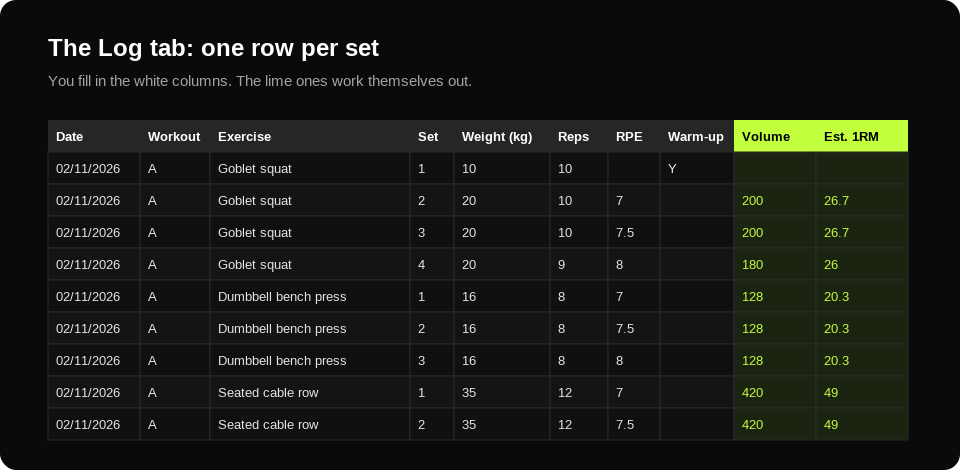
| Log | One row per set: date, workout, exercise, weight, reps, RPE (how hard it felt) and whether it was a warm-up. Volume and estimated 1RM fill in by themselves. |
| Progress | For each exercise: your best estimated 1RM, heaviest working set, number of working sets and the last date you trained it. It reads the Log, so you never type anything here except an exercise name. |
A spreadsheet is a notebook with a calculator glued to the back. You do the writing; it does the sums you'd otherwise skip.
How to open it in Google Sheets
- Download the file above.
- Upload it to Google Drive, then open it with Google Sheets. (Or start a new sheet and use File → Import.)
- Everything works the same as in Excel. On your phone, the Google Sheets app opens it too.
How to use the log
- One row per set. Three sets of bench press is three rows. It feels like more typing, but it's what lets the sheet spot your best set.
- Spell exercises the same way every time. The Progress tab matches names exactly, so "DB bench" and "Dumbbell bench press" count as two different lifts.
- Mark warm-ups with a Y. They're left out of volume, 1RM and Progress, so only your working sets count.
- Timed exercises like the plank: leave Weight blank and put the seconds in Reps.
- RPE is optional. It's how hard the set felt out of 10: 10 means nothing left, 8 means about 2 more reps in the tank.
The log starts with one example week so you can see it working. Clear those rows (clear the contents, don't delete the rows) when you start your own.
The formulas, in plain English
| Column | Formula | Example |
|---|---|---|
| Volume | Weight × reps | 20 kg × 10 = 200 kg |
| Est. 1RM | Weight × (1 + reps ÷ 30), the Epley formula. Only for sets of 1–12 reps, where it's most reliable. | 16 kg × 9 reps ≈ 20.8 kg |
The estimate is the same one our 1RM calculator uses. Treat it as a trend line, not a promise: if the number creeps up week to week, you're getting stronger, whether or not you ever test a true one-rep max.
How to make progress with it
The example week shows the simplest method, double progression. On Monday the dumbbell bench press is 16 kg for 8, 8, 8. On Friday it's the same 16 kg for 9, 9, 8. Same weight, more reps: that's progress. When you hit the top of the rep range (10, 10, 10 on a range of 8–10), go up in weight and build the reps again.
That only works if you know what you did last time, which is the whole point of a log. Memory is a terrible training partner: it rounds everything up.
Printable weekly gym routine chart
Prefer paper? Print this blank chart, fill in your days and exercises, and stick it on the fridge or keep it in your gym bag.
My weekly gym routine
| Day | Workout | Exercises (sets × reps) |
|---|---|---|
| Monday | ||
| Tuesday | ||
| Wednesday | ||
| Thursday | ||
| Friday | ||
| Saturday | ||
| Sunday |
Free from getgains.co
Spreadsheet or app?
A spreadsheet is free, private and endlessly tweakable. Its weak spot is the gym floor: typing into tiny cells between sets, with chalky fingers, on a phone. If that's where you give up, an app does the same job with less typing.
Get Gains is free to start. It fills in your previous best for each exercise before you lift, flags new personal bests as you log them, keeps warm-up sets out of your PBs and volume, and starts a rest timer between sets. See how it compares in our best workout tracker apps round-up.
Quick answers
Is the workout tracker template really free?
Yes. No sign-up and no email. Use it, change it, share it.
Does it work in Google Sheets?
Yes. Upload it to Google Drive and open it with Google Sheets, or use File → Import. All the formulas work there.
Does it work on a phone?
Yes, in the Google Sheets or Excel apps. It's easier to fill in on a bigger screen, though.
Can I use pounds instead of kg?
Yes. Type your weights in pounds and everything works the same; just ignore the "kg" in the column headings (or rename them).
What should I put in the plan?
If you're new, keep the beginner plan it comes with. Training 4 days a week? Try an upper/lower split; 6 days, push pull legs.